 ECEn 426
 Networking
 Application Layer
 Transport Layer
 Validate a TCP Packet
 Network Layer
 Link Layer
Table of Contents
Consistency underlies all principles of quality.
GitHub Classroom
Use the GitHub Classroom link posted in the Teams channel for the lab to accept the assignment.
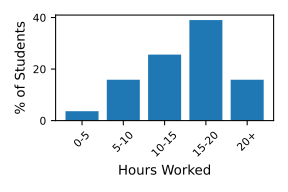
Historical Time Spent on Lab
Overview
You will be implementing a simplified version of a BitTorrent peer, called NibbleTorrent. NibbleTorrent is a peer-to-peer protocol, just like BitTorrent, but without the Bencoded data and simplified interactions between peers. You will be downloading files using the following procedure:
-
Get a torrent file and parse it. You can download them here.
-
Make a request to the tracker (listed in the torrent file) to get a list of peers that are seeding that file. I am providing the tracker. By making a request to the tracker, you are adding yourself as a peer for that torrent.
-
Go through the list of peers requesting chunks of the file. During this time, a peer might connect with you and request a piece of the file as well.
A word of caution—this is a hard lab! Essentially, you will be building a TCP server, TCP client, an HTTP client, all running concurrently. You then need to set up a way for these threads to communicate with each other. Give yourself plenty of time to work on this lab!
Protocol
Below outlines the specifics of the data formats and how requests/responses should be formatted to download a file using NibbleTorrent.
Torrent File
You will need to parse the torrent file to get the necessary tracker information. The torrent file is a JSON file with the following keys:
-
tracker_url: The URL of the tracker. This is where you go to find peers and register yourself as a peer. -
file_size: The size of the file the torrent file represents. -
piece_size: A large file is separated into smaller pieces that you can request from peers. This describes the size of each piece of the file, except for the last piece. -
pieces: This is a list of SHA-1 hashes of each piece of the file. This lets you verify that you received the correct piece and it has not been modified in any way. -
torrent_id: A unique identifier of the torrent, which is used to request information from the tracker and peers. It is the SHA-1 of the whole file.
Here is an example of a NibbleTorrent file:
{
    "torrent_id": "0800428c333c811ea3b6f7a0f01ee31c4ba75f85",
    "tracker_url": "http://ecen426.byu.edu:8088/announce",
    "file_size": 170345,
    "file_name": "byu.png",
    "piece_size": 4096,
    "pieces": [
        "d5084bc0cbe3d366f0e87216d1f8afa1805c0037",
        "aeba1c8051403a5c60ca83ff5e19b9f48fb08b9d",
        "81acd2489f34fdf76530f9c505d404fbd8091f4b",
        // ...
        "c0b97ae3e786dfd8a4ff96d0742b90397412bb9b"
    ]
}
The torrent files you will be working with are located here.
Tracker
After you have parsed the torrent file, you must make a request to the tracker_url to get a list of peers to download the file from. The tracker uses HTTP and parameters are passed using query strings. You must pass the following parameters:
-
peer_id: This is an ID that uniquely identifies yourself. It needs to following this format:-ECEN426-<NetID>. For example, a peer ID would look like-ECEN426-le0nh4rt. -
ip: The IP address you will want to receive peer connection to. Because the tracker will only live on BYU campus, you will want to use your BYU private IP address. -
port: The port you will want to receive peer connections on. -
torrent_id: The ID of the torrent you are interested in. You will get this from thetorrent_idfield in the torrent file.
Using the example from above, your request would look like:
GET http://ecen426.byu.edu:8088/announce?peer_id=-ECEN426-le0nh4rt&ip=10.35.120.175&port=6981&torrent_id=0800428c333c811ea3b6f7a0f01ee31c4ba75f85 HTTP/1.1
When you make this request with a valid peer ID, IP address, port, and torrent ID, the tracker will return a JSON payload with the following keys:
-
interval: The interval (in seconds) that you must send a request to the tracker in order to be considered a peer. -
peers: A list of all peers that are seeding the torrent. Each item in the list is a pair of items, with the IP address of the peer and the first item and the peer ID of the peer as the second item.
An example of the payload the tracker return:
{
    "interval": 30,
    "peers": [
        ["10.35.120.175:6981", "-ECEN426-le0nh4rt"],
        ["10.35.120.88:6977", "-ECEN426-rinoa"]
    ]
}
Peer Connections
Now that you have a list of peers, you are ready to make a connection with them and start downloading chunks of the file. This is done in three parts:
-
Connect to peer using a TCP socket. You will use the IP address and port number provided in the peers list.
-
Send a NibbleTorrent request. This will ensure that the peer is a NibbleTorrent client and it has the file we are looking for. Assuming the peer has the file we are looking for, it will return what parts of the file it has.
-
Request pieces of the file from the peer.
You need to be able to support up to 5 concurrent connections with different peers, requesting different parts of of the file.
NibbleTorrent Request/Response Format
Peers need to communicate with each other to request parts of a file. For this communication, the following general data format will be used:
 0                   1                   2                   3
 0 1 2 3 4 5 6 7 8 9 0 1 2 3 4 5 6 7 8 9 0 1 2 3 4 5 6 7 8 9 0 1
+-+-+-+-+-+-+-+-+-+-+-+-+-+-+-+-+-+-+-+-+-+-+-+-+-+-+-+-+-+-+-+-+
|    Version    |     Type      |            Length             |
+---------------+---------------+-------------------------------+
|                          ...Data...                           |
|                       (variable length)                       |
+---------------------------------------------------------------+
-
Version: This field is 8 bits and will always be
0x01. This allows clients to support future versions of the protocol where the format might be different. -
Type: This field is 8 bits and describes the type of request/response that the peer is making. There are 5 different types: hello request (0x01), hello response (0x02), piece request (0x03), piece response (0x04), and error response (0x05).
-
Length: The length of the data field in bytes. This field is 16 bits which means the data field is limited to 65,536 bytes.
-
Data: This field is variable length. Based on the type of message, you will interpret the data payload differently.
The peer you write must be able to send and receive all NibbleTorrent requests.
Hello Request/Response
After you connected to a peer, you will send them a hello request, with the type field value of 0x01. This request will ensure that you both are using the same protocol and that the peer actually has the file that you are trying to download. The payload of the request is the torrent ID in binary format. For example, a request might look like this (displayed in hex format):
01 01 00 14 84 e1 99 ca d6 b9 53 ee e0 c9 b6 d8 b7 26 12 dd b2 48 89 99
 ^  ^     ^ ^
 |  |     | start of message, which is the torrent ID (20 bytes long)
 |  |     message length (20 in decimal, 0x14 in hex)
 |  message type
 version
The peer will respond with a hello response (0x02) and list all of the pieces it has of the file, formatted as a bitfield. A bitfield allows a peer to efficiently encode what pieces it already has. A bitfield is like an array of booleans, where the index in the array corresponds to a piece of the file, and the value tells you if they have the piece or not. For example, if a file consisted of 4 pieces and a peer only had pieces 1 and 3, then its bitfield would be b1010. The first bit from the left (MSB) represents the first piece. If it had only the last piece of the file, then the bitfield would be b0001.
If a bitfield is not an whole number of bytes, then pad the bitfield with zeros. Using the previous example (torrent ID 0800428c333c811ea3b6f7a0f01ee31c4ba75f85, which only has 42 pieces) and assuming the peer has all of the pieces of the file, then the response would look like (in binary format):
111111111111111111111111111111111111111111000000
^                                         ^
bits represent what pieces the peer has   padding
Piece Request/Response
Once you have connected with a peer, sent a hello request, and received a hello response, you are ready to request pieces. This is done by sending a request with type 0x03 and with a payload of the index of the piece you are requesting. For example, if you wanted to request the third piece of a file, you would send this request:
01 03 00 01 02
The responding peer will then send the data using the piece response type (0x04), using the piece data as the payload. For example:
01 04 10 00 ...piece data...
Error Response
If a peer sends a malformed request or an error occurs on the responding peer, then the peer will respond with an error response message (0x05). The payload of this message is ASCII text describing what went wrong. For example if a peer requested a piece that was outside of the range of pieces, the responding peer could respond with “Piece index out of range” error message. It would look like:
01 05 00 18 50 69 65 63 65 20 69 6e 64 65 78 20 6f 75 74 20 6f 66 20 72 61 6e 67 65
50 69 65 63 65 20 69 6e 64 65 78 20 6f 75 74 20 6f 66 20 72 61 6e 67 65 is hex for “Piece index out of range”.
Command-line Interface (CLI)
To facilitate the protocol, your peer will need the following pieces of information:
-
Torrent file. This specifies what file you want to download and information about the tracker for that file.
-
Your NetID. Based on your NetID, your peer ID will be generated.
-
The folder that you want to download the file to. For simplicity, this will also be the folder where you upload data from when you are seeding.
-
The port from which peers can connect to you.
usage: peer.py [-h] [-p PORT] [-d DEST] [-f NETID] [-v] netid torrent_file

positional arguments:
  netid                 Your NetID
  torrent_file          The torrent file for the file you want to download.

optional arguments:
  -h, --help                Show this help message and exit.
  -p PORT, --port PORT      The port to receive peer connections from.
  -d DEST, --dest DEST      The folder to download to and seed from.
  -f NETID, --filter NETID  The NetID of the peer you will only download from.
  -v, --verbose             Turn on debugging messages.
Program Flow
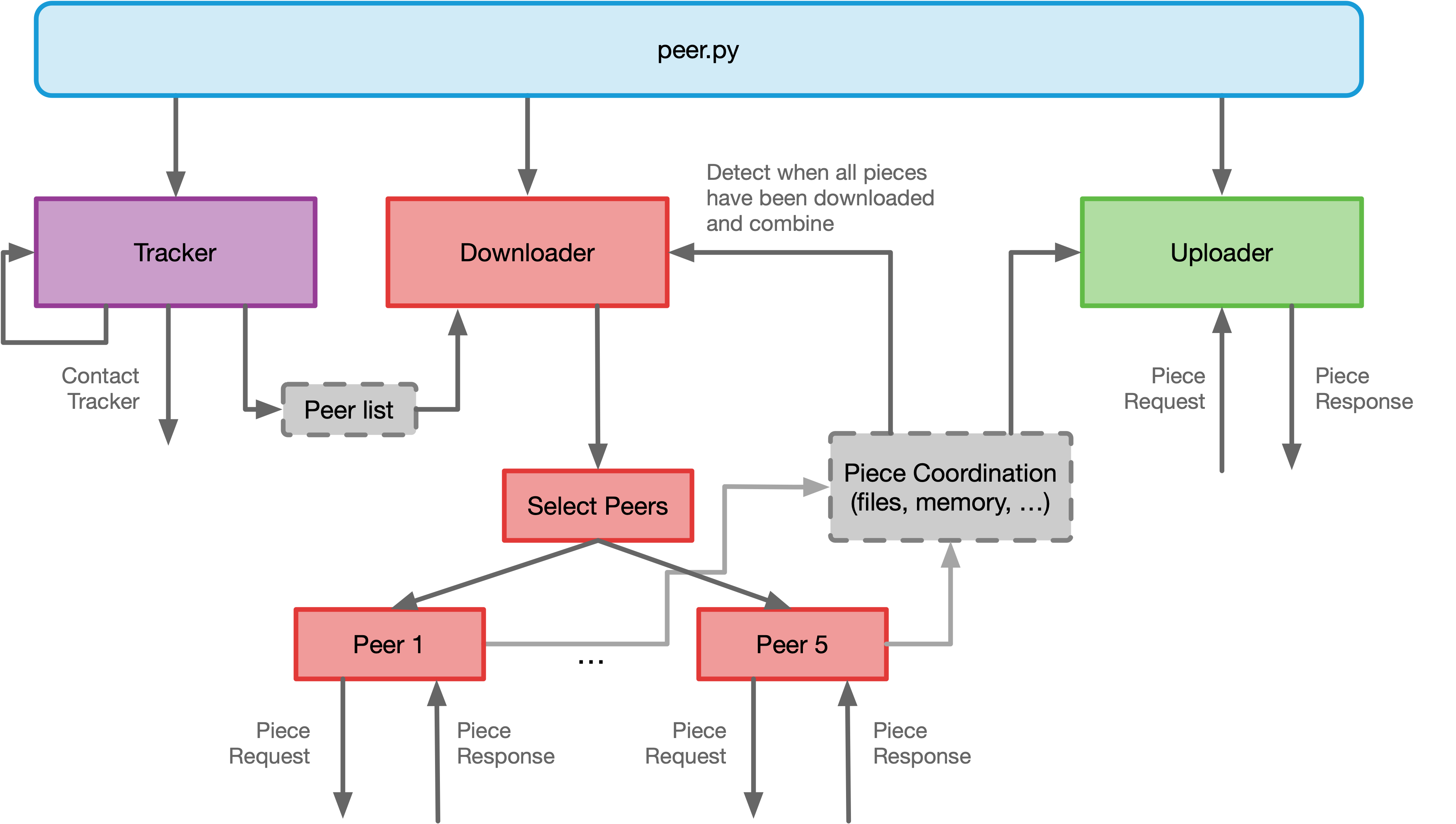
Since this is such a complicated program, it might be helpful to give you an overall flow of the program:
-
Your peer has three jobs, download, upload, and contact the tracker that need to be done all in parallel. Start your peer by spawning the necessary threads for each task.
-
Download the file you were asked to download based on the CLI. To do this, you will need a list of peers from the tracker. Periodically check with the tracker to get a fresh list of peers. Select peers and download chunks of the file from them.
-
While you are downloading, you must also be able to upload data to other peers.
-
Once the file has been downloaded, save it to the folder that was specified by the user.
-
Continue to seed your data to other peers.
Here is a diagram showing the general interactions between the different components.
Objectives
-
Get experience building a peer to peer network.
-
Combine many of the components from previous labs into one system.
Requirements
-
You must use Python 3.12 for this lab.
-
The only third-party Python library you are allowed to use in this lab is requests. That way you don’t have to write your own HTTP client. All other third-party libraries are off limits.
-
You must name your program
peer.py. -
Your program must have the usage pattern provided above and parse all of the options and arguments correctly.
-
The default port must be
8088. -
The default destination folder must be the current directory.
-
Your program must be able to download the file associated with the torrent file.
-
You must upload and download data at the same time with other peers.
-
You must support up to 5 concurrent connections with different peers.
-
You must validate each piece after downloading it to make sure it is correct.
Testing
This is a big program, but you can make testing easier by breaking it into smaller chunks. Feel free to add additional commandline options that let you test specific components of your lab. For example, first test the download component, then independently test the upload part. Finally test all of the parts together.
The tracker provides the the IP address and peer ID of each peer. It is a requirement for your lab to work with other people’s peers, but you can temporarily restrict which peers you connect with for testing purposes.
I will provide a few peers that will upload and download. Their peer IDs will be -ECEN426-bot*, where * can be zero or more characters.
Submission
To pass off this lab, you will need to demonstrate to me or the TA that your peer can:
- Contact the tracker (1 point)
- Download a file correctly (1 point) from multiple peers at once (1 point)
- Upload a file to other peers (1 point), including yourself (1 point)
- Demonstrate understanding of your code (1 point)
To demonstrate this, follow these steps:
-
Start your peer in one terminal and download a file. Verify that the file has been received correctly. This also shows that you can contact the tracker. Make sure you are printing out log messages that show what peer you are downloading a piece from to show that you can download from multiple peers at once.
-
Start a second peer in another terminal (changing your ID, saving the file to a different location, and running on a different port) and download the same file. Make sure to print out log messages that show what peer you are downloading a piece from and what peer you are uploading a piece to. Verify that the file has been downloaded correctly by the second peer.
-
Stop your second peer, and then using the command line option, limit the peers you download from to only your first peer and restart your second peer. This will verify that you can download the whole file from your first peer. Verify that the file has been downloaded correctly.
At the end, I will ask you questions about your code, how you implemented it, and why you implemented it in that way. You must demonstrate to me that you understand your code and your design decisions.