 ECEn 426
 Networking
 Application Layer
 Transport Layer
 Validate a TCP Packet
 Network Layer
 Link Layer
Table of Contents
First, solve the problem. Then, write the code.
John Johnson
GitHub Classroom
Use the GitHub Classroom link posted in the Teams channel for the lab to accept the assignment.
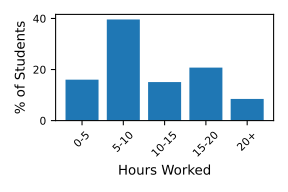
Historical Time Spent on Lab
Overview
In this lab, you will be building a TCP server that implements your favorite protocol (the same one as the last three labs). The individual parts of the lab are outlined below. This lab (and all future labs) must be done in Python, but many of the algorithms that you have developed and refined in the previous labs can be reused in this lab.
Protocol
This lab will be using the same version of the protocol you developed in TCP Client v3 (binary header and pipelining).
The request protocol will be formatted as follows:
 0                   1                   2                   3
 0 1 2 3 4 5 6 7 8 9 0 1 2 3 4 5 6 7 8 9 0 1 2 3 4 5 6 7 8 9 0 1
+-+-+-+-+-+-+-+-+-+-+-+-+-+-+-+-+-+-+-+-+-+-+-+-+-+-+-+-+-+-+-+-+
|  Action |                    Message Length                   |
+-+-+-+-+-+-+-+-+-+-+-+-+-+-+-+-+-+-+-+-+-+-+-+-+-+-+-+-+-+-+-+-+
|                             Data                              |
+-+-+-+-+-+-+-+-+-+-+-+-+-+-+-+-+-+-+-+-+-+-+-+-+-+-+-+-+-+-+-+-+

Action: 5 bits
Message Length: 27 bits
Data: variable
Once your server has received a request, it will parse it, transform the message, and send back a response. In processing a request, if an unexpected action is encountered or a request is malformed, then the message “error” should be returned. Your response must be formatted as:
 0                   1                   2                   3
 0 1 2 3 4 5 6 7 8 9 0 1 2 3 4 5 6 7 8 9 0 1 2 3 4 5 6 7 8 9 0 1
+-+-+-+-+-+-+-+-+-+-+-+-+-+-+-+-+-+-+-+-+-+-+-+-+-+-+-+-+-+-+-+-+
|                         Message Length                        |
+-+-+-+-+-+-+-+-+-+-+-+-+-+-+-+-+-+-+-+-+-+-+-+-+-+-+-+-+-+-+-+-+
|                             Data                              |
+-+-+-+-+-+-+-+-+-+-+-+-+-+-+-+-+-+-+-+-+-+-+-+-+-+-+-+-+-+-+-+-+

Message Length: 32 bits
Data: variable
To simplify this lab, a few adjustments will be made:
-
You only need to support one client at a time.
-
Typically for a server, you provide the IP address you would like the server to bind to (e.g.,
127.0.0.1,192.0.2.33), or0.0.0.0to bind to all interfaces. For this lab, you can bind to all interfaces. In Python this is done by passing in an empty string""as the binding IP address.
Command-line Interface (CLI)
The CLI will have no arguments and three options: port, verbose flag, and help flag. The port option changes the port that your server binds to. Your program will generally print nothing to stdout. The only exception is if the --help option is set. Your program must print to stderr any errors while running the server and log messages, if the verbose flag is set.
Your server will be designed to block forever. Once it has handled one client, it will wait for another client to connect. As a result, you must be able to properly handle an interrupt signal (SIGINT). A process is usually sent this signal by typing ctrl-c in a terminal window. Your server must catch this signal and properly shutdown the server.
Logging
Like the previous labs, I strongly encourage you to use logging to help debug your program and understand its flow. Python provides a powerful logging library. Spend some time learning it and it will pay off later.
Objectives
-
Learn to build a server.
-
Become familiar with Python network programming.
Requirements
-
You must use Python 3.12 for this lab (and all other Python labs).
-
You can not use any third party Python libraries for this lab. If you have to
pip installor clone any repos, in order to import a library, stop. The only exception is the formatter, Black, which you have topip install. However, you do not use it in your code. -
For all socket related tasks, you must only use the low-level
socketinterface that Python provides. No high-level server socket interfaces are allowed. -
The name of your program must be named
tcp_server.py. -
tcp_server.pyaccepts no arguments, and three options, as outlined above.
usage: tcp_server.py [-h] [-p PORT] [-v]

optional arguments:
  -h, --help            show this help message and exit
  -p PORT, --port PORT  port to bind to
  -v, --verbose         turn on debugging output
-
The default port must be
8083. -
You must set the
SO_REUSEADDRoption on the server socket. -
Your server must handle any request size.
-
Your server does not need to support IPv6 or concurrent clients.
-
Return “error” (with the appropriate header) if an error occurs when processing a request, such as an invalid action.
-
If a client does not send enough data (e.g., the length is 10 but they only send 4 bytes), your server should block and wait for the remaining bytes of data. Otherwise, your server may not work when handling large amounts of data.
-
Properly shutdown server when an interrupt signal (
ctrl-c) is sent to your process. If your server is in the middle of sending/receiving to a client, you can let that finish before stopping the server. -
As per the coding standard, you must use the Black formatter.
Testing
I have provided test.py in your repository to help you test your server code. It creates the binary header and message and sends it to your server. You will want to add more to test.py to fully test your server. You can also use the client that you created in lab 3.
Submission
To submit your code, upload it to Gradescope.
Resources
-
socket — Low-level networking interface. Make sure to look at all of the functions available to you.
-
Logging HOWTO and the Logging interface.