 ECEn 426
 Networking
 Application Layer
 Transport Layer
 Validate a TCP Packet
 Network Layer
 Link Layer
Table of Contents
It’s hard enough to find an error in your code when you’re looking for it; it’s even harder when you’ve assumed your code is error-free.
GitHub Classroom
Use the GitHub Classroom link posted in the Teams channel for the lab to accept the assignment.
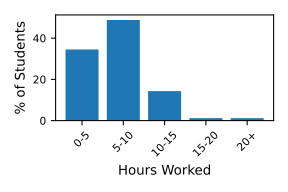
Historical Time Spent on Lab
Overview
In this lab, you will be building a client for a simplified version of TLS, called Simple TLS. While the protocol might seem slightly bloated or redundant, each part of the protocol protects against a specific threat. TLS is a general-purpose security transfer protocol that often works with HTTP. Once a TLS connection has been established, the client can send normal HTTP requests that get secured by the TLS connection. However, to simplify the lab, the server will send you a file after you have connected correctly through Simple TLS; no need to request a file.
Protocol
Simple TLS contains a few handshakes to verify the server and establish a shared key between the client and the server. The overall flow of messages is shown below:

The client connects to the server and sends a hello message. The server responds with a cryptographic nonce and its certificate. The client verifies the certificate, then sends its own cryptographic nonce that is encrypted using the server’s public key (public keys are included inside certificates). Now that the client has its own nonce and a nonce from the server, it has enough information to generate the master secret. The server will decrypt the encrypted nonce and generate the same master secret. As a final step before data is sent, the server will send a hash of all the messages it has sent to and received from the client. The client will verify the hash of the messages and then send its own hash of the messages it has sent and received. Once the server has verified the hash it has received from the client, it will start sending data to the client.
Header
All messages sent, including data messages, have a header. This lets the client and server know how to interpret the data. The general structure of the header, along with the sizes of each field, is shown below.
 0                   1                   2                   3
 0 1 2 3 4 5 6 7 8 9 0 1 2 3 4 5 6 7 8 9 0 1 2 3 4 5 6 7 8 9 0 1
+-+-+-+-+-+-+-+-+-+-+-+-+-+-+-+-+-+-+-+-+-+-+-+-+-+-+-+-+-+-+-+-+
|     Type      |                    Length                     |
+---------------+-----------------------------------------------+
|                          ...Data...                           |
|                       (variable length)                       |
+---------------------------------------------------------------+
-
Type: This field is 8 bits (or 1 byte) and describes the type of message. There are six different types: error (0x00), hello (0x01), certificate (0x02), encrypted nonce (0x03), hash (0x04), and data (0x05).
-
Length: The length of the data field in bytes. This field is 24 bits (or 3 bytes) long.
-
Data: This field is variable length. Based on the type of message, you will interpret the data payload differently.
I have provided a module, message.py, that can assist you with parsing the header.
Message Formats
Hello
After the client connects to the server, it starts the process by sending a hello message (0x01). The hello message contains no data.
Certificate
When the server receives a hello message from a client, it responds with a certificate message (0x02). The certificate message contains two pieces of information: the server’s nonce and the server’s certificate. In this protocol, all nonces are 32 bytes. The first 32 bytes of the message’s payload will be the server’s nonce, and the remaining payload will be the certificate.
On the client’s end, to verify the certificate, you only need to call utils.load_certificate and verify that it returns a value other than None. There are more thorough ways of verifying certificates, but for this lab, we will only ensure the certificate is formatted correctly.
Nonce
Upon verifying the certificate from the server, the client will generate a 32-byte nonce, encrypt it with the server’s public key, and send it to the server in the nonce message (0x03). You can access the public key by calling certificate.public_key() on the verified certificate object.
Key Derivation
With both nonces, the client and server have enough information to generate a shared key. It is considered a bad practice to use one shared key as the encryption key and data integrity key for both the client and the server. It is better to have two keys, one for encryption and one for data integrity, for both client and server (four keys in total). To help with this, you can call utils.generate_keys to generate the four keys. It will return a tuple with four items:
- The server’s encryption key
- The server’s data integrity key
- The client’s encryption key
- The client’s data integrity key
Hash
In response to a nonce message, the server will send a hash message (0x04). The hash message payload will contain a message authentication code (MAC) of all of the messages sent and received by the server, in the order they were received/sent, using the server’s data integrity key. The messages include the header of the message. Specifically, the server will hash the following:
MAC(hello message + certificate message + nonce message, server's data integrity key)
You can use the utils.mac with the appropriate data and key to calculate this value. Once the client has verified the hash is what the client expects, the client will generate its own hash, hashing all of the messages sent and received by the client (not including the server hash), in the order they were sent/received, using its data integrity key. This hash will be sent to the server in the hash message (0x04).
Data
Assuming that the previous hash matches the server’s hash, the server will start sending data messages (0x05). Using TCP, data is “streamed” between two devices. However, this streaming abstraction starts breaking down when you need to integrity protect data. Message authentication codes (MAC) need to be used to verify that the data has not been changed, but where do you put the MAC? At the end of the whole stream? Simple TLS (and TLS) deals with this by breaking the stream into chunks. These chunks are encrypted and integrity-protected.

To get the data sent by the server, the client must first decrypt the data using the server’s encryption key. The decrypted data has the following format:
- Sequence number: 4 bytes
- Data chunk: variable bytes
- MAC: 32 bytes
After you pull apart the decrypted payload, verify the sequence number, calculate the MAC on the data chunk using the server’s data integrity key, and finally compare the MAC with the MAC sent from the server. If the sequence number and MAC are correct, then the data chunk can be used. The server will continue to send data messages until it has sent a complete file, then it will close the socket. Warning: an advisory will occasionally change the encrypted data or replay data, so you must check the sequence number and verify the MAC.
If you have made it this far, save the data to a file with a .png extension. If you can correctly view the image you received, you have successfully completed the protocol portion of the lab!
Command-line Interface (CLI)
Your program must take one optional argument and four options. The only argument is the output file name. When your client connects to the server properly, the server will send you a file. You will save the data to the specified file name. If a user would like to write to stdout, a dash (-) can be used. You should be familiar with the four options and how they work.
usage: simple_tls_client.py [-h] [-p PORT] [--host HOST] [-v] file

positional arguments:
  file                  The file name to save to. It must be a PNG file extension. Use - for
                        stdout.

optional arguments:
  -h, --help            show this help message and exit
  -p PORT, --port PORT  Port to connect to.
  --host HOST           Hostname to connect to.
  -v, --verbose         Turn on debugging output.
Objectives
-
Get experience with security principles.
-
Build a client for an encrypted and integrity-protected communication protocol.
Requirements
-
You must use Python 3.12 for this lab.
-
The only third-party Python library you are allowed to use in this lab is cryptography, and the two modules I am providing,
crypto_utils.py, andmessage.py. You shouldn’t have to use the cryptography library directly if you plan on usingcrypto_utils.pyAll other third-party libraries are off limits. -
You must name your program
simple_tls_client.py. -
Your program must have the usage pattern provided above and parse all of the options and arguments correctly.
-
The default port must be
8087, and the default hostname must belocalhost. -
Your application must print the response to
stdoutif-is provided as the file name. All other class norms must be followed (e.g., print errors tostderr, correct return codes, etc.). -
You must be able to download and display the image the server sends to you.
-
Answer these questions on security. The questions should be answered in a file called
questions.txtand placed in your repository.
Testing
I will also be running a Simple TLS server at ecen426.byu.edu:8087.
Submission
To submit your code, upload it to Gradescope.
Resources
- Generating a cryptographic nonce
-
How to write binary data to
stdout(by default,stdoutin Python only supports text)