 ECEn 626
Table of Contents
Overview
In the previous labs you were introduced to the basics of GNU radio through your implementations of well known protocols: AM and FM radio. As you developed these examples, you may have begun to understand just how capable a tool an SDR can be. However, the two designs that you implemented were extremely well known, documented, and proven. In GNU Radio-land, FM radio is basically the “hello world” of SDR design. How do we get from a simple “hello world” to designing our own stuff?
While you probably won’t develop something as complex as say, 802.11g, this lab will explore a bit more about designing a wireless communication system. To help you now (and later), we will discuss various decisions to be made when creating a wireless protocol to help you come up with questions and ideas to consider when deciding on your own semester-long protocol design projects. We will then have you practice some GNU radio companion again, but without any specific design constraints to better prepare you to create your own protocol. You will implement both the transmitter and receiver this time.
Objectives
By the end of this lab, you will:
- Understand some key factors involved in designing a wireless protocol.
- Implement a simple QPSK transmitter and receiver in GNU Radio Companion.
- Observe and analyze signal quality and potential sources of degradation.
Part 1: Wireless Design
What factors affect the design of a wireless protocl? Here is a table of considerations that someone might need to take into account when designing a wireless protocol:
| Consideration | Explanation |
|---|---|
| Data rate / Throughput | The rate at which useful data is received. |
| Range | How far the wireless protocol is expected to be able to reach. |
| Power | How much energy can your antenna actually use? |
| Multiple Access Control | How many people can talk using your protocol? Can they talk at the same time? How do you know who is who? |
| Data quantity | How much data is being sent at once? a few bytes, or a large stream? |
| Spectral Usage | How much space does your protocol use in the frequency domain? How much is it allowed to use? How well does it use the space given? |
| Noise Expectations | What else lives in your freuency band? Do you expect your signal to live above the noise floor? |
| Synchronization | How does your receiver know when your transmitter is talking to it? |
| Networking and Wide Access | Who else can I actually talk to? Am I limited to a gateway, or can I talk to any nearby peer? What kind of information can I actually get from talking? |
| Processing Power | How difficult is it to decode this signal? |
| Security and Privacy | Security defines your signals ability to get from one place to another without being replaced or changed. Privacy defines whether someone else can get the message out of your signal, even if it wasn’t intended for them. |
As you probably guessed, this list isn’t exhaustive. In fact, its probably only a very small portion of the considerations. The only way come close to listing all the considerations is to ensure that the protocol is application specific. This means that any given protocol has parameters and features specifically designed to meet certain needs. Whatever requirements you decide are most important for a particular application will impose constraints on all your other factors. For example, a low power system will often have a more limited range than a higher power one. It is your job as a wireless protocol designer to come up with the balance of what to prioritize, and where else to sacrifice in order to make those priorities come true.
Let’s take a look at a few wireless protocols and analyze some of the trade-offs that they make in order to be successful.
WiFi
WiFi (IEEE 802.11) is one of the most widely used wireless communication protocols, designed primarily for high-speed, short-to-medium range data transmission. It operates in several frequency bands, including 2.4 GHz, 5 GHz, and 6 GHz, and is optimized for broadband internet access and local networking.
Trade-offs and Design Choices
| Factor | WiFi Design Considerations |
|---|---|
| Data Rate / Throughput | WiFi is designed for high-speed data transfer, with modern standards (WiFi 6E, 802.11ax) supporting gigabit speeds. However, speeds depend heavily on signal conditions, interference, and distance. |
| Range | WiFi is optimized for indoor environments, with ranges typically around 30–50 meters indoors and up to 100 meters outdoors. Walls and obstacles significantly reduce range. |
| Power | WiFi is relatively power-hungry compared to other wireless protocols, especially for battery-operated devices, which is why alternatives like Bluetooth and LoRa exist for low-power applications. |
| Multiple Access Control (MAC) | Uses Carrier Sense Multiple Access with Collision Avoidance (CSMA/CA) to manage access. Devices must “listen” before transmitting to avoid interference, which can lead to delays in congested networks. |
| Data Quantity | Designed for large amounts of data (e.g., video streaming, file transfers). Modern standards use MIMO (Multiple-Input Multiple-Output) to increase throughput. |
| Spectral Usage | Uses wide frequency channels (20 MHz, 40 MHz, 80 MHz, or even 160 MHz in newer standards). This wide bandwidth allows for high data rates but increases susceptibility to interference. |
| Noise Expectations | Operates in unlicensed bands (e.g., 2.4 GHz, 5 GHz), which are crowded with many other devices (Bluetooth, microwaves, etc.), making interference a major issue. |
| Synchronization | Uses preamble sequences to help receivers synchronize with incoming data. |
| Networking & Wide Access | Supports star topology, where devices connect to a central router. Mesh networks are possible but less common in consumer setups. |
| Processing Power | WiFi requires significant processing power for encryption, error correction, and modulation/demodulation. |
| Security & Privacy | Uses WPA2/WPA3 encryption to protect data, but networks can still be vulnerable to attacks like packet sniffing or deauthentication attacks. |
LoRa
LoRa (Long Range) is a low-power, long-range wireless protocol used in IoT (Internet of Things) applications. It is designed to operate in sub-GHz ISM bands (e.g., 868 MHz in Europe, 915 MHz in the U.S.) and uses Chirp Spread Spectrum (CSS) modulation to maximize coverage while minimizing power consumption.
Trade-offs and Design Choices
| Factor | LoRa Design Considerations |
|---|---|
| Data Rate / Throughput | LoRa sacrifices data rate for range. Typical rates are 0.3 to 50 kbps, which is extremely low compared to WiFi but sufficient for IoT applications (sensor readings, GPS updates). |
| Range | LoRa is designed for long-range communication, with urban ranges of 2–5 km and rural ranges up to 15 km in ideal conditions. |
| Power | LoRa is designed for low-power operation, making it suitable for battery-powered devices that need to last for months or years without recharging. |
| Multiple Access Control (MAC) | Uses ALOHA-based random access protocol, meaning collisions can occur, but since transmissions are infrequent, this is generally acceptable. |
| Data Quantity | Optimized for small packets (sensor data, GPS coordinates). Large data transmissions (e.g., video, voice) are impractical. |
| Spectral Usage | Uses narrowband channels (typically 125 kHz or 250 kHz), making it efficient in terms of spectral usage but limiting data rates. |
| Noise Expectations | Designed to operate below the noise floor, meaning it can still function in noisy environments with significant interference. |
| Synchronization | Uses preambles and coding schemes to ensure synchronization, though latency can be high due to long transmission times. |
| Networking & Wide Access | Often used in star-of-stars topology, where devices communicate with gateways that relay data to cloud services. |
| Processing Power | Very low processing power required, allowing for cheap, low-power microcontrollers. |
| Security & Privacy | Uses AES-128 encryption, but security largely depends on network design and implementation. |
Designing Your Own Protocol
Now that you have read a few protocols and their priorities, it is time for you (and your team, if applicable) to decide on the constraints for your own protocol. Your protocol should be based on a real-world application, and should be implementable on SDRs within the semester.
While this lab talked a lot about theoretical protocol design, on the SDRs, several of these constraints like power, range, etc. are cemented already. As such, your decisions will be based partially on the theoretical real-world application, but mostly on the set of decisions most important to the SDR design (after all 626 is SDRs, not wireless protocol development!).
You will fill out the Wireless Protocol Decision Matrix and submit that as proof of your protocol’s thoughful design. Your protocol may not use every option on the decision matrix, and it may use pieces that are not on the matrix. You are welcome to add or remove pieces, as long as you consider your choices.
As an example, an Example Decision Matrix has been provided that uses Wifi 802.11ac as its reference.
Part 2: More GNU Radio Practice
This part of the lab provides additional practice to help you become more familiar with designing flowgraphs in GNU radio. You will design a simple QPSK protocol and answer certain questions about the protocol you have developed. To get started, first download the template flowgraph provided for you. Your goal is to fill in the missing pieces listed below.
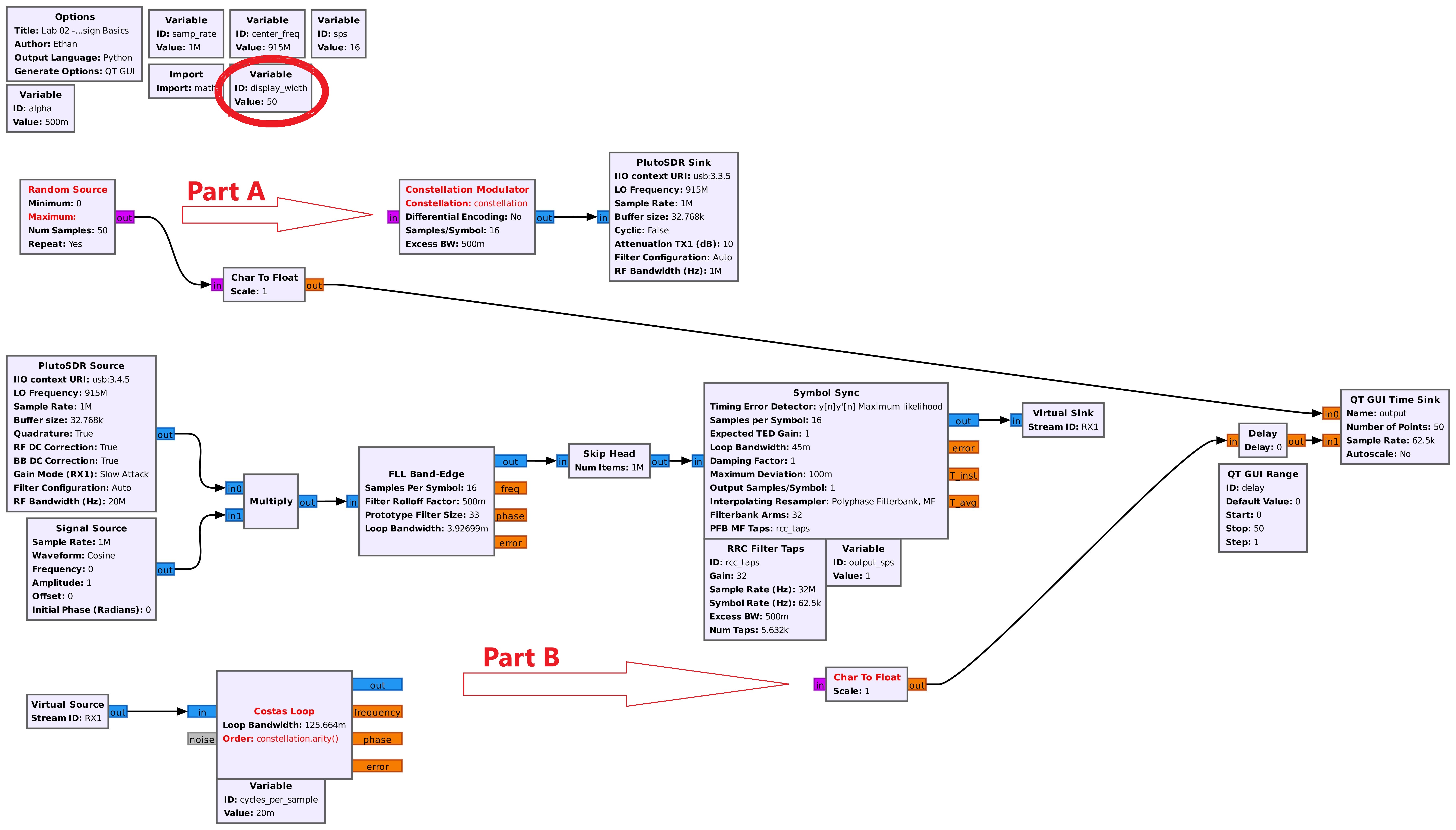
Part A will ask you to create a constellation object and format a random source of data such that you can modulate it into symbols. Choose a QPSK (or higher if you’d like) constellation.
Part B will ask you to decode the incoming data again, based on the modulation scheme that you originally chose. This should essentially be the reverse of the modulation you did in Part A.
Protocol Design
You protocol should have the following properties:
- Uses QPSK to modulate data.
- Uses differential encoding.
Transmitter Design
Your transmitter flow should:
- Generate random binary data, or use a file as an input.
- Apply differential encoding to the data.
- Modulate the data using QPSK.
- Transmit.
Receiver Design
The receiver flowgraph will:
- Receive a signal.
- multiply down to baseband.
- Perform carrier synchronization.
- Demodulate the QPSK symbols.
- Decode the differential encoding.
- Extract and display the received data.
Testing Your Protocol
You’ll notice in the template there is a variable called “display_width” (highlighted in red in the reference image). This changes both the number of random samples and the number of points displayed on the GUI Time Sync. There is also a GUI range called “delay” that allows you to delay your output. This is simply so you can delay your output to the nearest multiple of the input and see if your incoming data exactly matches your randomly generated data. An image is provided below for reference.
Answer the following questions:
-
Consistency: How consistently does your protocol work? At what range do you stop seeing the data correctly?
- Can you come up with any factors that improve the range of your signal?
-
Latency: Adjust your “delay” range until your incoming data lines up with your outgoing data stream. Look at the number of symbols you had to delay. If that number of symbols (symbols, not samples) was exactly the timing difference between the signals, what would the latency be? Come up with a formula (in seconds) for the set of possible latencies that exist assuming that the signal is delayed some number
nof repeats behind the original signal (i.e. some setn*S + d, whereS = display_width, andd = delay). What is the lowest latency your signal could have? Can you make a guess as to what the actual latency of your signal is? - Complications: Come up with a different modulation scheme than the one you are working with (again QPSK or higher). Try to implement it. Assuming that it worked (whether it did or not isn’t quite as important since you’ve already done one), what changes would it have made to the protocol you developed? What kinds of tradeoffs did you make to achieve those changes?